
Post
Comparing Search Engines in 2026
#Search Engines #Comparison #Privacy #Web Search #Kagi #Duckduckgo #Brave Search #Google #Bing
It’s March 2026, and I’m getting tired of using Google. My search results feel worse than they used to, AI summaries are pushed front and centre, and I can’t shake the constant feeling that I’m being actively tracked. So, I wanted to take a proper look at the alternatives.
Before I started researching alternatives, the only real Google replacement I was familiar with was DuckDuckGo, mainly because I used it as my default search engine for a while a few years ago.
Around the same time, I also switched to Firefox after years of using Safari, because I wanted a browser that would synchronise cleanly between my iPhone, MacBook, and Fedora desktop.
In this post, I’ll be comparing Kagi, Qwant, Startpage, Ecosia, DuckDuckGo, and Brave Search, while using Google and Bing as reference points.
The Contenders
Kagi
Kagi is the only fully paid option on this list, and that alone makes it unusual. Its pitch is simple: rather than funding search through ads, profiling, and engagement bait, it charges users directly.
At the time of writing, Kagi offers a free trial with 100 searches, a Starter plan at $5 per month for 300 searches, a Professional plan at $10 per month for unlimited searches, and an Ultimate plan at $25 per month for unlimited searches plus Kagi Assistant, including Research mode and more advanced AI features.
Kagi was founded in 2018 and is based in the United States. Kagi says it uses a mixture of external sources and indexes alongside its own search infrastructure, and that is one of the reasons its results can feel broader than engines tied too closely to a single upstream provider. Kagi has also published details of an independent security audit by Illumant, which concluded with a “Highly Secure” rating and “no findings of material significance”.
That said, Kagi is not free of controversy, and I think that matters more here than with some of the other engines, because Kagi explicitly sells itself not just as a better search engine, but as a more principled one.
One issue is its continued use of Yandex as one of many upstream sources. This is not hidden if you go looking for it, but it is also not necessarily something an ordinary user would realise from the marketing. In a 2025 thread on Kagi’s own feedback forum, users objected to Kagi’s Yandex integration on geopolitical and ethical grounds, arguing that they did not want subscription money flowing, however indirectly, towards a Russian company. Kagi CEO Vlad Prelovac replied that Yandex represented around 2% of Kagi’s total costs, that Kagi had been using the API since 2019, and that removing any source on political grounds would degrade search quality while having minimal real-world impact. He framed this as part of Kagi’s commitment to search neutrality rather than political filtering, and pointed to Kagi’s broader source-mixing model and its policy on search neutrality and information access. Whether that is a principled defence or an evasive one will probably depend on your politics and your tolerance for trade-offs. Personally, I think it is at least fair for subscribers to see this as an ethical wrinkle rather than a non-issue.
Kagi Feedback thread
The other issue is leadership tone. Kagi’s CEO is unusually visible in public discussions, which can be refreshing compared with the usual polished corporate PR fog, but it also means he can come across as combative in a way that is, frankly, not always very CEO-like. A good example is the response cycle around blogger Lori’s post, “Why I Lost Faith in Kagi”, which criticised Kagi’s AI direction, finances, product sprawl, and leadership. I could not fetch the original post directly because the site blocks automated access, but the associated Hacker News discussion makes the shape of the controversy clear enough. The thread includes multiple commenters describing Vlad as “combative”, “belligerent”, or more interested in lecturing than listening, particularly in arguments around privacy and product direction. To be fair, other commenters defended him as simply direct rather than rude, and Vlad himself pushed back strongly on the financial concerns, saying Kagi had “turned profitable recently” and denying that side projects had jeopardised the business. So this is not a clean-cut “gotcha”. But I do think it feeds a broader impression that Kagi sometimes wants the credit of being a user-first, values-driven company without always taking criticism in the way a mature leadership team probably should.
Hacker News discussion of “Why I Lost Faith in Kagi”
None of that automatically makes Kagi bad. In fact, part of Kagi’s appeal is that it feels like a company run by people who actually care about search. But that same closeness to its founder also means the company’s tone, judgement, and occasional defensiveness become part of the product experience in a way they simply do not with something faceless like Google. Vlad seems passionate about developing a privacy focused, censorship free, independent search engine - and who can blame him for wanting to develop other products with a similar ethos?
Qwant
Qwant presents itself as a privacy-first European search engine, developed in France and operating under European data protection law. Its public messaging is strong: no profiling, no sale of personal data, and a distinctly European alternative to American search giants.
However, the reality is more nuanced than the homepage slogan. Qwant’s own privacy policy makes clear that Microsoft is still involved in parts of its search and advertising stack. So while Qwant is clearly more privacy-conscious than Google or Bing, it is not wholly independent of Microsoft infrastructure.
Qwant also says it has been building more of its own search capability, and in 2025 its partnership with Ecosia on the European search index project Staan began going live. Ecosia described this as the launch of a new European-based search index, which is one of the more interesting attempts currently underway to reduce dependence on Google and Microsoft.
My first impression, however, was poor. In my own testing, Qwant often felt visibly slower than the other engines here, with results pages sometimes taking three to five seconds to settle. That is anecdotal rather than scientific, but it mattered to the experience.
Startpage
Startpage occupies an unusual position in this comparison. Its core promise is appealing: Google search results, but without Google learning who you are directly.
Startpage says it is based in the Netherlands, does not save or sell personal data, and offers Anonymous View, a proxy-style feature that lets you open websites from search results without directly exposing yourself to the destination site.
The complication is trust and ownership. In 2019, Startpage announced an investment from Privacy One Group, and its support documentation now openly explains its relationship with Privacy One and System1. That does not prove any privacy wrongdoing, but it does mean users are justified in looking a little more closely at the governance and incentives behind the brand.
Consumer privacy expert Liz McIntyre also publicly distanced herself from Startpage shortly after the investment, leaving this Reddit comment which became widely cited in privacy circles.
So Startpage may offer some of the strongest raw search relevance in this list thanks to its Google-powered results, but it is also one of the engines where the ownership structure is part of the product evaluation.
Ecosia
Ecosia is the least privacy-centred entrant here in branding terms, because its main pitch is environmental rather than anti-tracking. Use Ecosia, click ads, and some of the revenue helps fund tree planting and wider climate projects. Ecosia publishes transparency reports and impact reporting to support that claim.
The company is based in Germany and has historically relied heavily on Bing for search results. More recently, though, Ecosia and Qwant have pushed forward with Staan, a European search index intended to reduce dependence on American search infrastructure. In August 2025, Ecosia announced that its European-based index was starting to go live.
So while Ecosia is not best understood as a hard-line privacy product, it does deserve more credit than it sometimes gets for trying to support alternative search infrastructure rather than merely reskinning an existing engine.
DuckDuckGo
DuckDuckGo is probably the best-known privacy-focused brand on this list. Its current privacy policy still says, very plainly, “we don’t track you”. More specifically, DuckDuckGo says it does not store personal search histories tied to individuals, and that viewing search results is anonymous.
Its business model is a little more complicated than many people realise. DuckDuckGo makes money from contextual search ads, and those ads are delivered in partnership with Microsoft’s ad network. DuckDuckGo says ad clicks are managed by Microsoft’s ad network, but that Microsoft has committed not to associate ad-click behaviour with a user profile other than for accounting purposes.
DuckDuckGo’s earlier 2012 privacy policy was arguably more straightforward in tone, reflecting a simpler stage in the company’s growth and monetisation.
Its reputation also took a hit in 2022 when it emerged that Microsoft trackers were receiving special treatment inside DuckDuckGo’s browser protections because of contractual limits, a controversy reported by outlets such as TechRadar. DuckDuckGo later said it would expand protections and restore broader blocking, which it discussed in More Privacy and Transparency.
DuckDuckGo also used Yandex for some results in certain markets, but paused that relationship after Russia’s invasion of Ukraine, as reported at the time by Protocol.
There is plenty of criticism of DuckDuckGo floating around online, such as this post from Growthscribe, but bar the 2022 Microsoft controversy, I have found little solid evidence for many of the broader claims often repeated against the search engine itself. In my view, a lot of criticism tends to conflate separate issues: the search engine, the browser, Microsoft ad delivery, and unrelated app incidents.
So the fairest summary is probably this: DuckDuckGo remains one of the most privacy-friendly mainstream search options, but it is not a purity-test product.
Brave Search
Brave Search is one of the more interesting engines here because it has pushed hardest on the question of index independence. Brave says it operates its own search index, and that matters in a market where many “alternatives” are still, in practice, wrappers around Bing or Google. It also offers features such as Goggles, which let users re-rank or filter results using custom rules.
Brave also has an optional paid plan for ad-free results. On the developer side, Brave’s API offering changed in 2026: rather than a traditional free tier for new users, Brave now gives $5 in free monthly credits, with search requests priced at $5 per 1,000 requests.
That said, Brave comes with more baggage than most of the other engines here, and I think that is part of the product evaluation whether Brave fans like it or not.
Some of that baggage is relates to Brave’s core product, the Brave Browser. In 2020, Brave was criticised for automatically inserting affiliate referral codes into certain cryptocurrency URLs, something Brave later apologised for and described as a mistake. In 2021, Brave also disclosed and patched a Tor window DNS leak issue, which is exactly the sort of bug you do not want attached to a browser that markets itself so heavily on privacy.
Some of it is cultural and political. Brave’s co-founder and CEO, Brendan Eich, is of course famous well beyond Brave because of JavaScript and Mozilla, but he also resigned as Mozilla CEO in 2014 after backlash over his donation in support of California Proposition 8, which opposed same-sex marriage. Reporting at the time also highlighted earlier donations to right-wing US political candidates. More recently, The New York Times reported on backlash to Eich’s COVID-related commentary on X / Twitter, which reopened the broader question of how far users can or should separate Brave’s products from its leadership’s politics, and Eich’s X account remains very much part of his public persona.
None of that automatically makes Brave Search bad. The search engine should still be judged on the quality of its results and Eich appears to have settled down from saying anything particularly outlandish in recent years, whilst still showing commitment to a privacy first browser and search.
Search One - World of Warcraft
Because I’m currently on a World of Warcraft kick, and because World of Warcraft: Midnight has only just launched, I wanted to see what each search engine would give me for the query:
“World of Warcraft what to do in Midnight”
At the time of writing, Midnight went live on 2 March 2026, with Season 1 beginning on 17 March 2026. That timing matters. A strong result in early March 2026 should focus on finishing the campaign, levelling to 90, launch-week priorities, gearing sensibly, and preparing for Season 1. Results aimed at pre-patch material, vague filler, or boosting-service slop should score poorly.
Qwant
Qwant again took a noticeable amount of time to load. Its first result, from Icy Veins, followed by Wowhead’s guide, was highly relevant. I was less convinced by the placement of the official Blizzard store page so high up, but the first two results did at least show that Qwant understood the intent of the search.
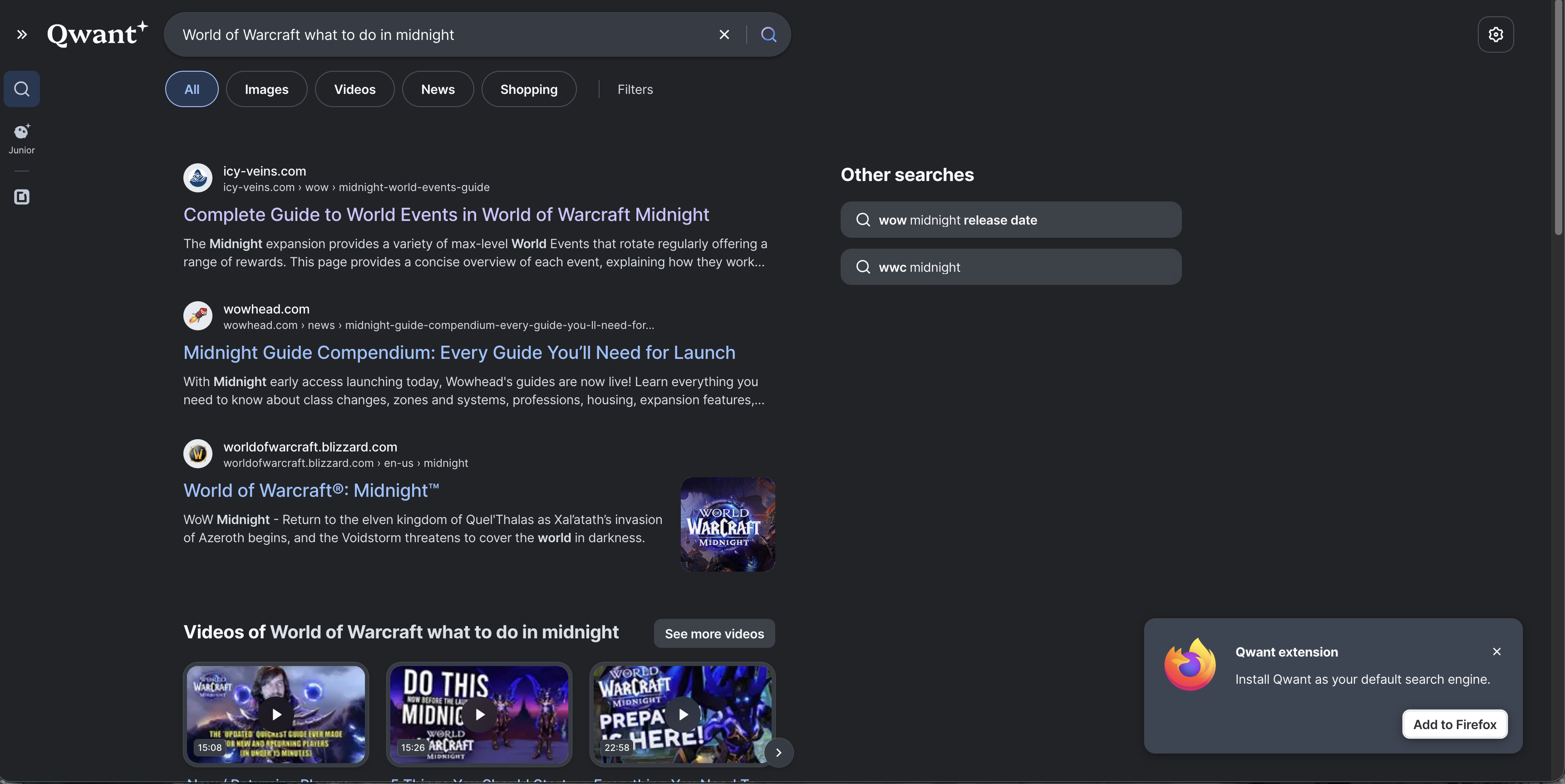
Below that, Qwant surfaced several relevant YouTube videos. The actual results were better than the loading speed suggested they would be.
That said, an intrusive prompt to install the Qwant extension sat over part of the page until dismissed. It is a small thing, but it made a poor first impression.
Ecosia
Ecosia took a different approach and led with four video results, only one of which was especially useful. Below that was a Reddit thread aimed more at early-access-week discussion than a clean “what should I do now?” answer. It then repeated one of the videos it had already surfaced near the top of the page.
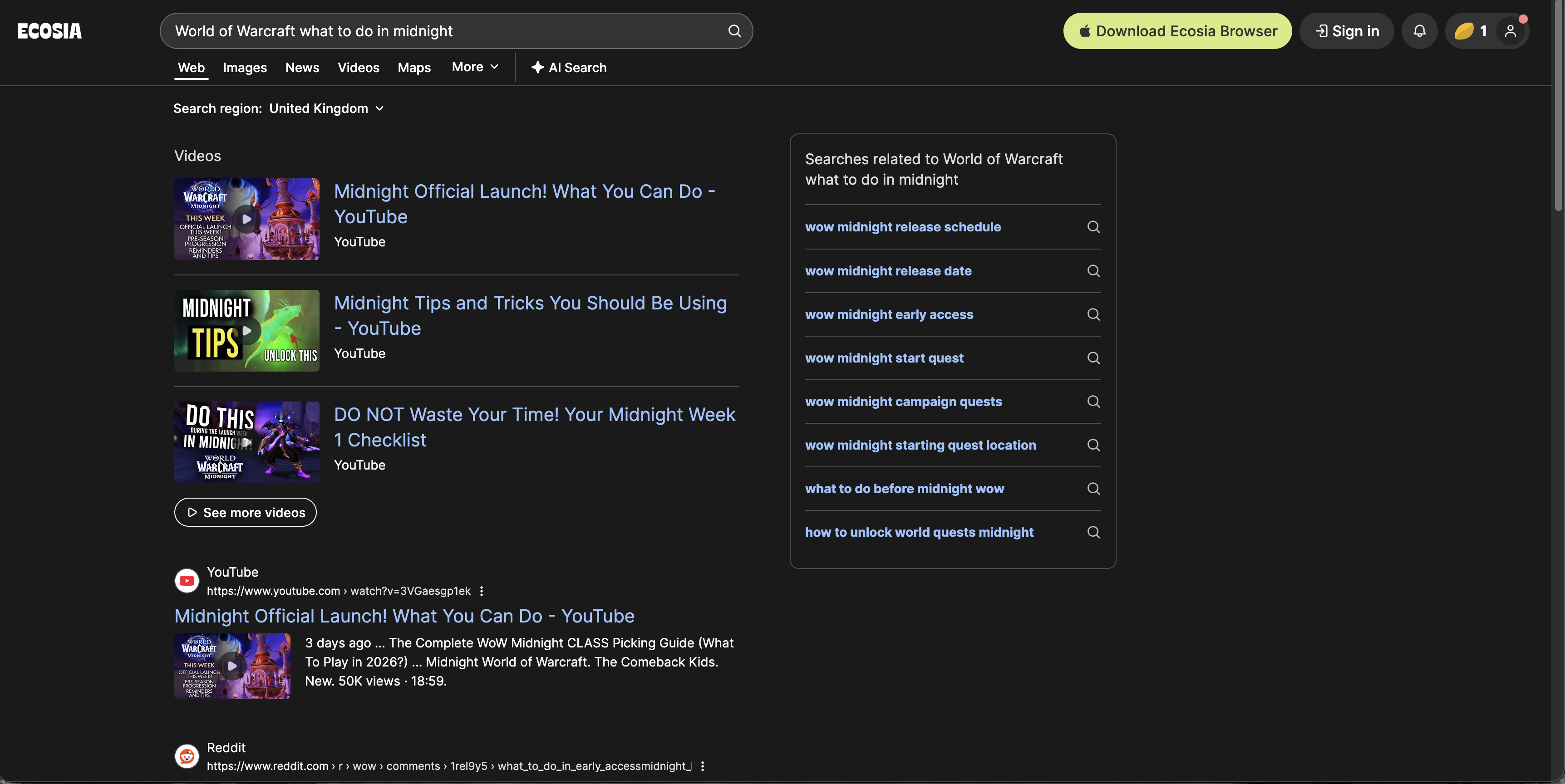
Overall, the page felt unfocused. There was relevant material there, but it was buried among repetition and weaker suggestions. The extension prompt was also far less obtrusive than Qwant’s, tucked neatly into the header instead of blocking part of the page.
Startpage
Startpage was again quite video-heavy. Only the fourth video result felt directly relevant, although it did also surface a useful Wowhead result lower down the page.
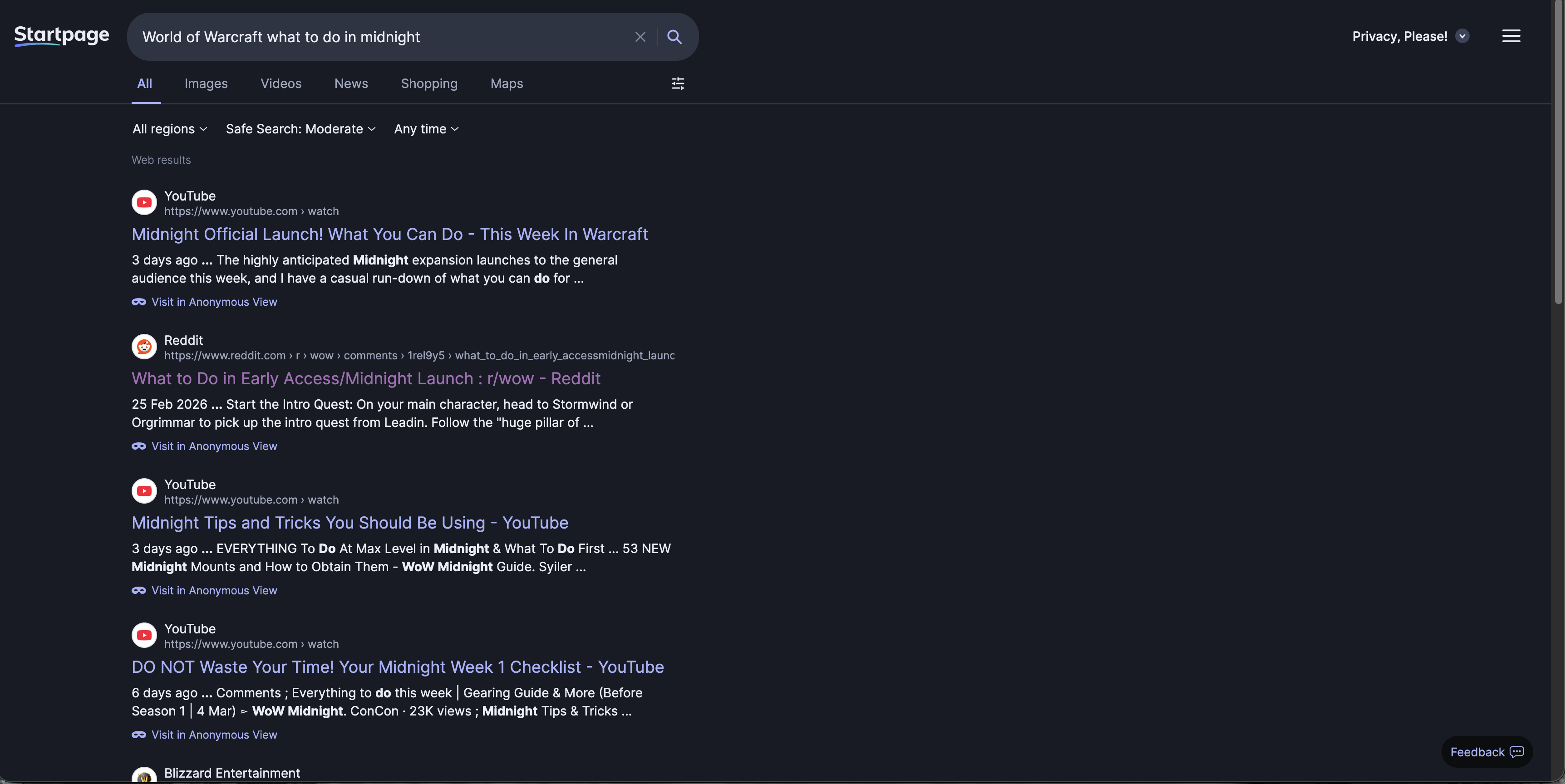
For a query like this, I wanted a strong written guide immediately, not a page that made me scroll through a stack of videos first. Given that Startpage’s selling point is access to Google-quality results with more privacy, this was not especially impressive.
DuckDuckGo
DuckDuckGo opened with an AI-generated response via its assistant. It was not especially novel, but it was at least directionally correct: complete the campaign, level up, and gear sensibly.

More importantly, the actual search results were solid. The first results included Icy Veins and Wowhead, which is exactly what I wanted to see. It also surfaced a couple of smaller sites which, while not on the level of Wowhead, still offered relevant information rather than obvious junk.
The lower half of the page was less focused, but overall this was a decent search. Not perfect, but clearly in the right ballpark.
Brave Search
Brave pushes its AI interpretation very prominently, and visually the page feels polished in a way that is quite reminiscent of Google. The right-hand information panel was particularly well presented.
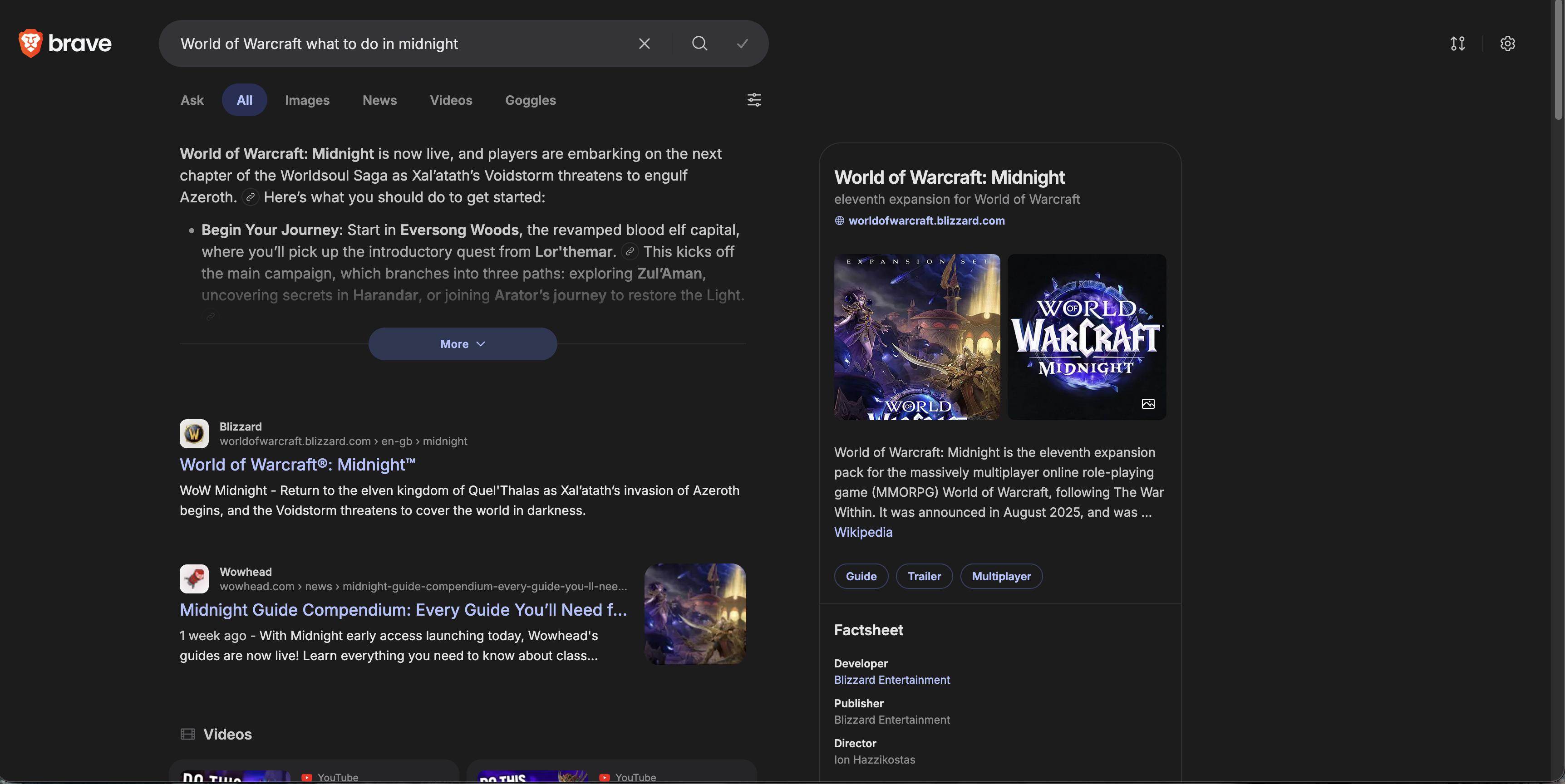
The actual results were more mixed. The first result was simply the general World of Warcraft website, which is not what I wanted, but the second result was the relevant Wowhead guide. After that came several videos, one of them in German, followed by a more uneven spread of Blizzard posts, Wikipedia, Reddit, and more videos.
The AI summary itself was broad but shallow. It told me to level up, learn professions, unlock expansion systems, and prepare for early endgame. None of that was wrong, but it lacked the kind of specificity that would make it genuinely useful to someone asking this question during launch week.
Kagi
Kagi opened with six video results, and to be fair, all of them were relevant. Beneath that came the Wowhead guide, which was a strong start.

After that, though, the results became more questionable. I was surprised by how many boosting-service or boosting-adjacent sites appeared. Even where those pages were dressed up as blog posts offering advice, I do not think boosting services are a particularly trustworthy or impartial source of guidance for a newly launched expansion.
Kagi’s AI suggestion, unlike the others, did not populate automatically and instead had to be manually requested. When called, it broadly matched the others: generic advice to level up, complete the campaign, and work through the expansion systems. Perfectly serviceable, but not especially insightful.
Google’s top result was Wowhead, which is exactly what I wanted to see. That was followed by a condensed discussions and forums section featuring Reddit and the Blizzard forums, both of which were highly relevant for a launch-week search like this.
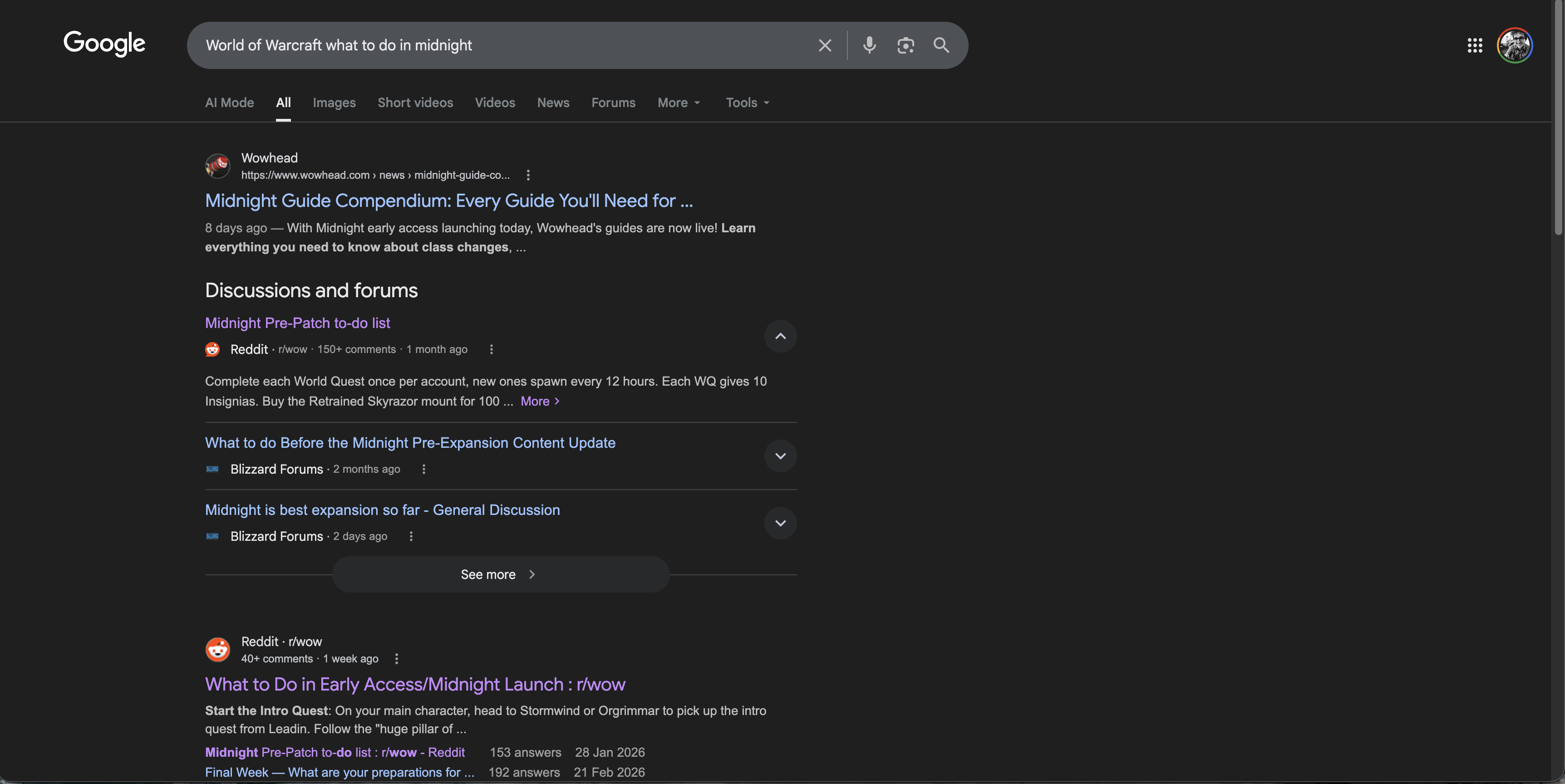
Below that came more Reddit links and a couple of useful YouTube videos. The relevance across the first page was extremely strong. Aside from one result pointing to the Midnight store page, the page was consistently on-topic.
This was the strongest search result page of the lot. That may be frustrating if your goal is to leave Google behind, but in this particular test, Google understood the query best.
Bing
Bing was immediately off-putting. The first thing presented to me was not a clean list of results, but an AI summary and two small suggestion pills, one of which pointed to a boosting service.
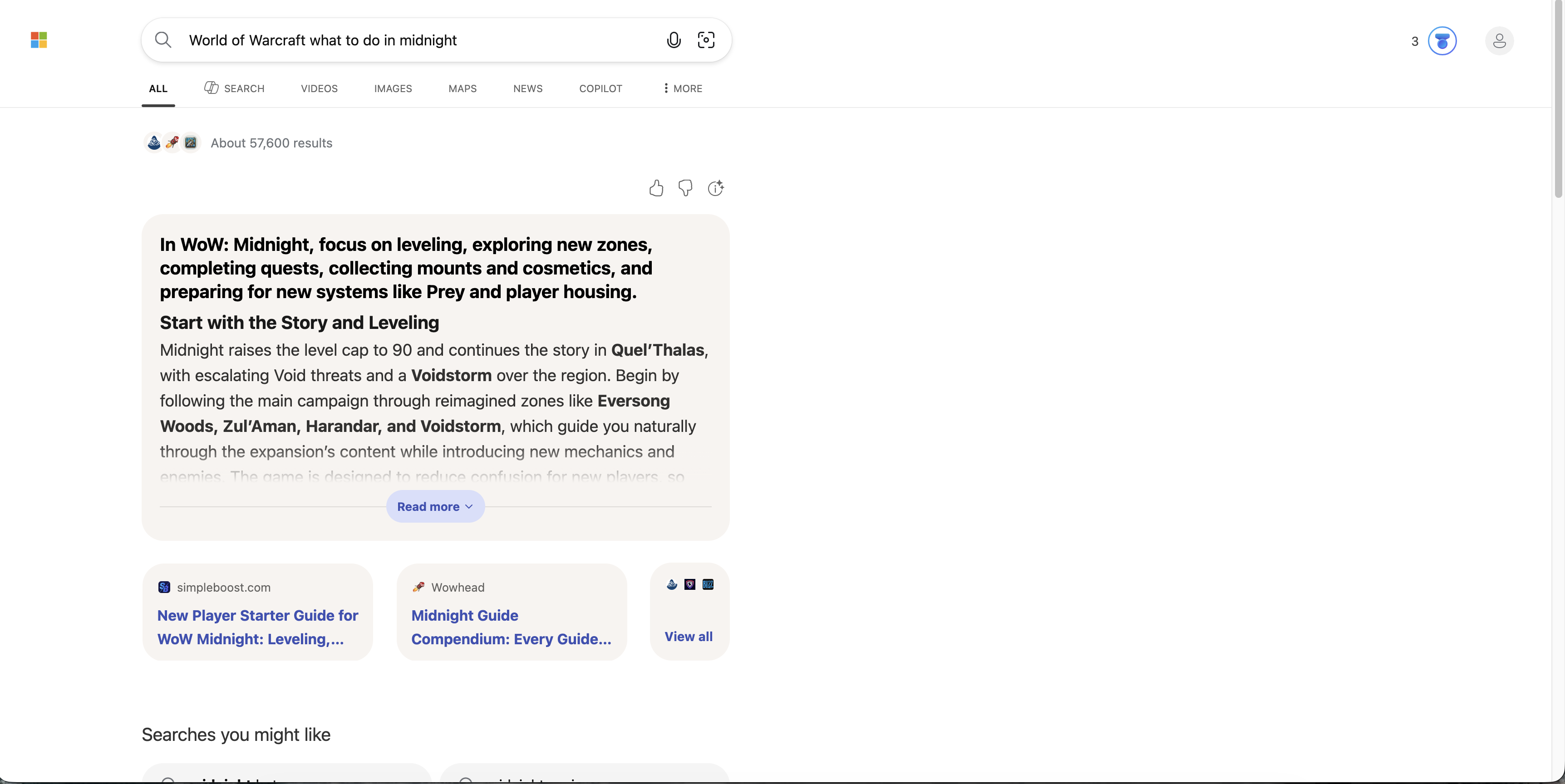
Scrolling further down, I was then shown “searches you might like”, which included links that appeared to be unrelated gambling-adjacent results such as “midnite casino”. I cannot overstate how poor that looked in the context of a straightforward World of Warcraft query.
Below that, Bing did eventually produce the expected Icy Veins and Wowhead links, followed by some familiar videos and, again, a boosting-service site. There were relevant results here, but Bing buried them beneath clutter and bizarre framing.
My impression was simple: poor.
Thoughts on Search One
Even from a single query, some themes were already becoming obvious.
Google still seems to have the strongest raw relevance as to be expected from the largest search engine, with DuckDuckGo following close behind. It’s a shame Qwant’s performance is so slow as it’s results were also top quality. Both Ecosia and Startpage disappointed with their offerings, and taking into account their (lack of) privacy credibility, I don’t quite see what they bring to the table. Kagi was probably the most divisive result, offering great results in line with DuckDuckGo and Google, alongside the most controversial results. Brave Search looks polished and independent-minded, but often seems too eager to push AI summaries and mixed media over direct answers.
Onto the next query!
Search Two: Linux Distribution Recommendation
After watching the 27 February 2026 WAN Show episode, and listening to Linus talk through some of the difficulties they had during the Linux challenge, asking the engines for a Linux distribution recommendation felt like a good next step.
The query was:
“Best Linux Distribution 2026”
This is a good test because it is exactly the sort of thing search engines love to answer badly. The web is absolutely full of low-effort Linux listicles, AI-generated recommendation sludge, SEO farms, and recycled “best distro” articles that are basically the same five paragraphs with different branding. A genuinely good result here should do a few things well: it should understand that there is no single best distro for everyone, it should break recommendations down by use case, and it should avoid drowning the page in generic affiliate-listicle nonsense.
Kagi
Kagi gave me what was probably the most interesting mix of results.
At the top sat a ZDNET article on the best Linux distros in 2026, followed by a sensible spread of written results and videos. The ZDNET piece itself was decent enough, although the actual distribution picks felt a little quirky and not especially mainstream. Beneath that, Kagi also surfaced ZDNET’s related distro roundups from previous years, which was not useless, but did make it obvious how much authority that one domain was carrying for the query.
We then got a Reddit thread from December asking specifically about lightweight distributions for 2026, which, while not exactly matching the search, was still highly relevant. After that came three videos, all of them fairly solid, including one clearly aimed at beginners rather than people already deep in Linux-land. That was a nice touch, because beginner-friendly framing is exactly what a lot of “best distro” searches are really asking for even when they do not say so outright.

What I found particularly interesting was Kagi’s listicles section. Rather than just giving me one or two giant tech sites and a load of junk, it surfaced ten ranked list-style results from a mixture of bigger publications and smaller blogs. There was still the usual amount of “top 10 distros” fluff, because that is what the web serves up for this query, but Kagi felt relatively good at filtering out the really obvious AI slop. A lot of the results were blogs, yes, but they were at least blogs written by people who seemed to actually have opinions.
Kagi’s AI quick answer mostly pointed back to ZDNET and summarised the broad consensus from the page, but it also inferred from the wider result set and specifically recommended Linux Mint and Ubuntu for beginners. That felt sensible enough, even if I was slightly offended on Fedora’s behalf by how absent Fedora was from the overall framing.
Overall, this was one of Kagi’s better showings. It still leaned heavily on listicles, because frankly every engine did, but it felt like a fairly curated version of the Linux recommendation web rather than a dumpster of SEO filler.
Google’s results were good, but oddly a little lighter on substance than I expected.
The page leaned heavily on Reddit, which in fairness is not the worst instinct for this kind of query. Real people discussing real installs is often more useful than yet another “top 12 beginner distros” article written to sell VPNs. Google also surfaced a few smaller blogs and broadly the same three video results that Kagi had already shown.
Its AI overview was actually one of the better ones here. It was clear, concise, and split recommendations up by use case: beginners, gaming, power users, and older hardware. That is exactly how this query should be handled. If you are going to force-feed me an AI summary, that is at least the correct shape for it.
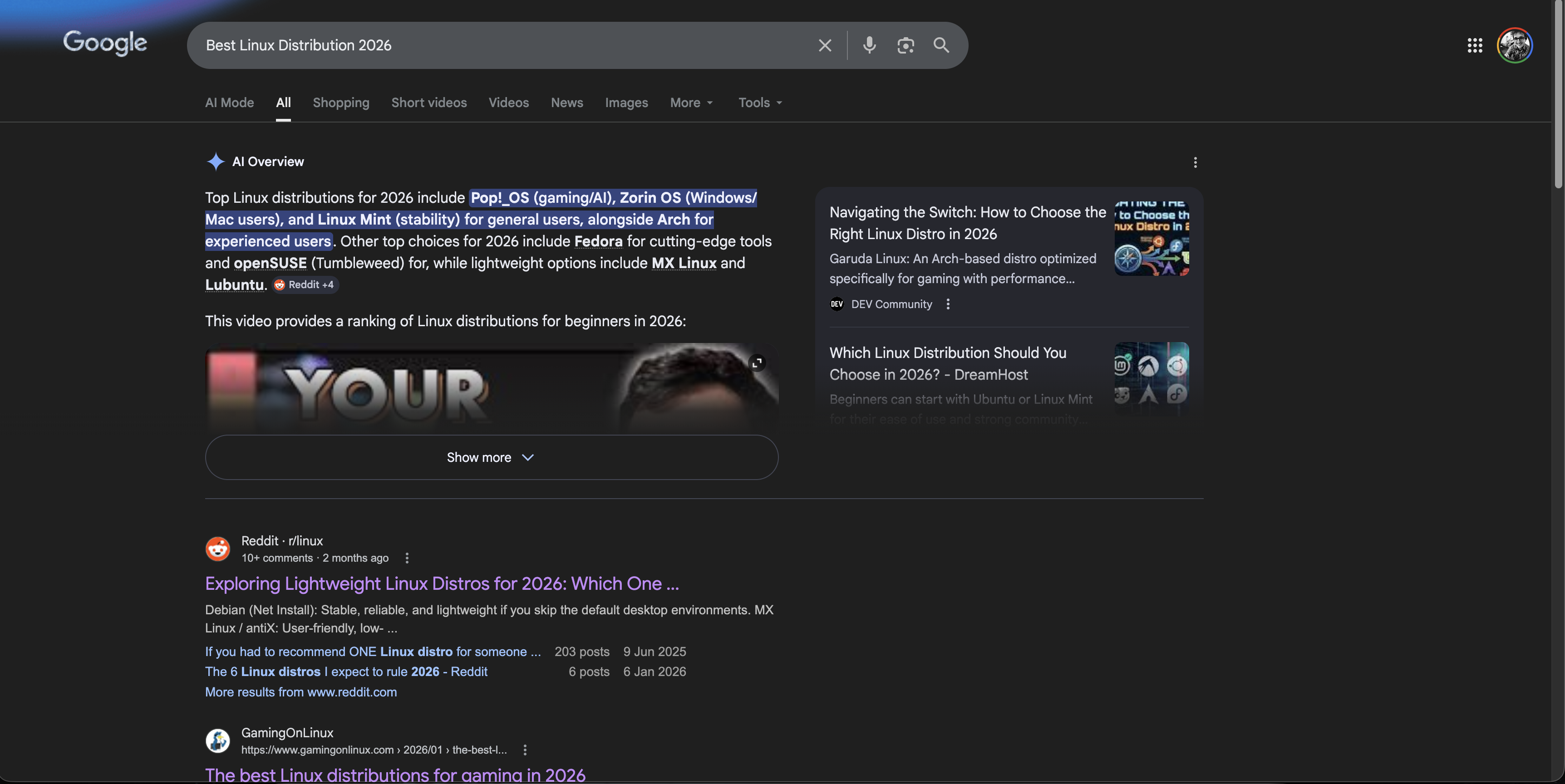
The problem was that the rest of the page felt slightly underpowered. The supporting links were not bad, but Google seemed oddly content to let the AI answer do a lot of the work. There was less of that feeling of “here are the best written sources on the web for this query” and more of “here is a neat summary, and then some stuff beneath it”.
Still a good result page, but not quite the knockout I expected from Google.
Bing
Bing once again put AI front and centre, but to be fair, the AI summary itself was not bad. It offered recommendations such as CachyOS, Linux Mint, and Debian depending on use case, which at least showed some awareness that “best Linux distro” is not a one-size-fits-all question.
Unfortunately, once you looked below the summary, the page got much weaker.
I got four website links, three of which looked suspiciously like AI-generated listicles or at least the sort of thin “best distro” content that exists to catch search traffic rather than help anyone install Linux. After that came the same three videos that had already shown up elsewhere.
That was the disappointing bit. Linux is one of those topics where there is a huge amount of community knowledge out there: forum posts, Reddit threads, distro docs, independent bloggers, and years of opinionated nerd discourse. And yet Bing managed to turn it into a very sterile page with relatively few actual website results and a lot of AI doing the heavy lifting. Not terrible, but shallow.
Ecosia
Ecosia immediately slapped me in the face with an AI overview simply telling me to use the latest Ubuntu LTS.
That is not bad advice in a vacuum. In fact, for a lot of normal people it is probably perfectly good advice. But as an answer to “Best Linux Distribution 2026”, it felt comically blunt. No nuance, no use cases, no “it depends”, just Ubuntu LTS and crack on.
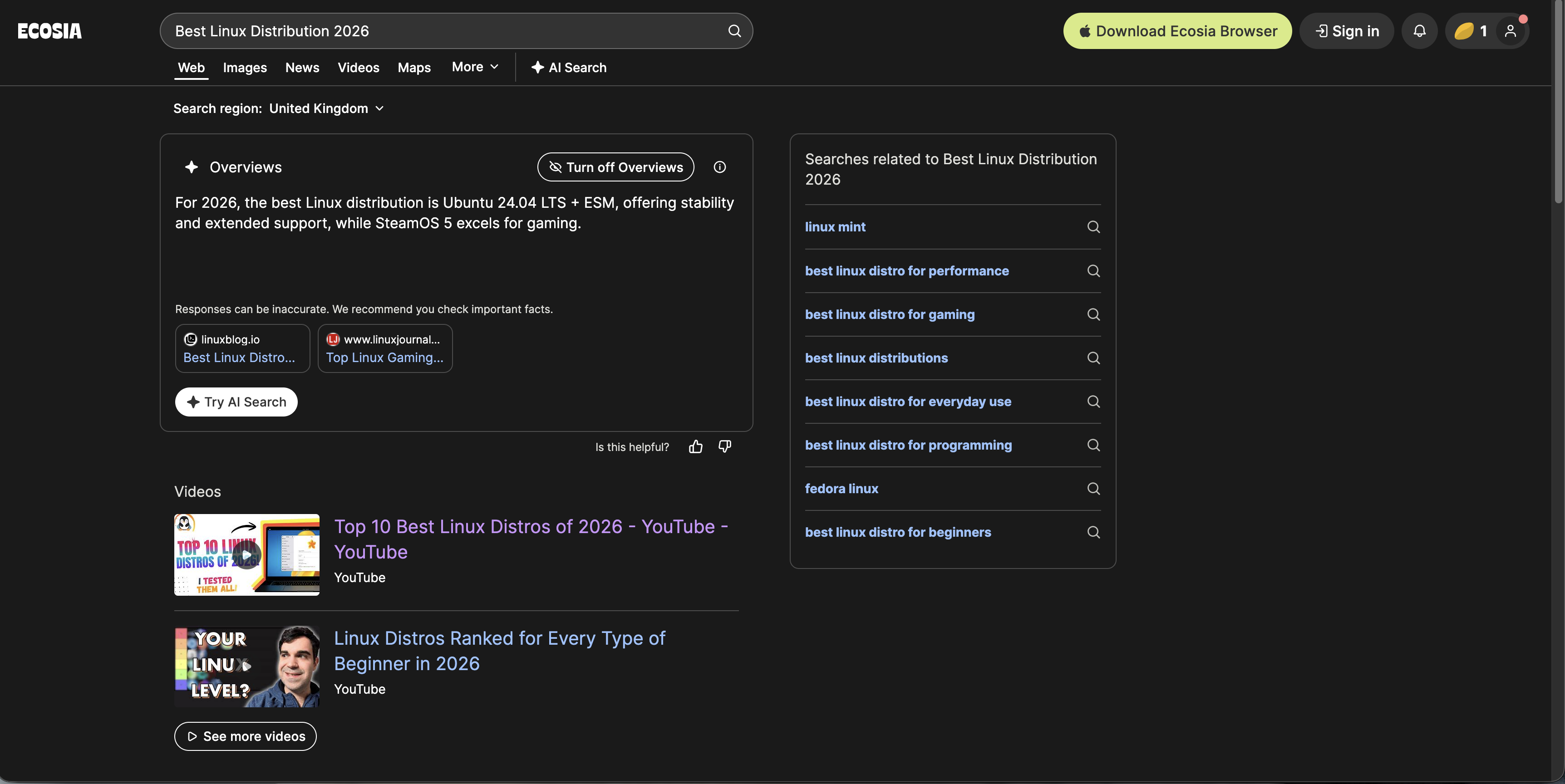
Underneath that, the page looked very familiar: the same three videos, the same lightweight-distribution Reddit thread, and a set of listicles ranging from decent to pretty middling. It was not offensively bad, but it did feel generic in a way that made me immediately forget half the page after looking at it.
Ecosia did little wrong here, but it also did not do much right beyond parroting the safest possible recommendation.
Qwant
Qwant was, refreshingly, free of AI summaries for this one. No chatbot waffling, no attempt to pretend there is a single machine-generated answer to a subjective Linux question. Just ten results.
The catch, of course, is that those ten results were mostly listicles of varying quality.
The same ZDNET distro article that ranked highly elsewhere was top here too, followed by a pretty standard spread of “best distro” pages from across the web. Unlike Google and several of the others, Qwant did not surface Reddit results here, which I think was a genuine weakness. For Linux queries, Reddit is often a useful sanity check precisely because it contains actual people disagreeing with one another rather than a row of polished SEO posts pretending there is consensus.
So Qwant’s result page was clean, and in a sense refreshingly old-fashioned, but also quite sterile. And, as before, it was still the slowest search out of the bunch.
Startpage
Startpage returned ten results that were, broadly speaking, very similar to Google’s, except with less of the useful messiness.
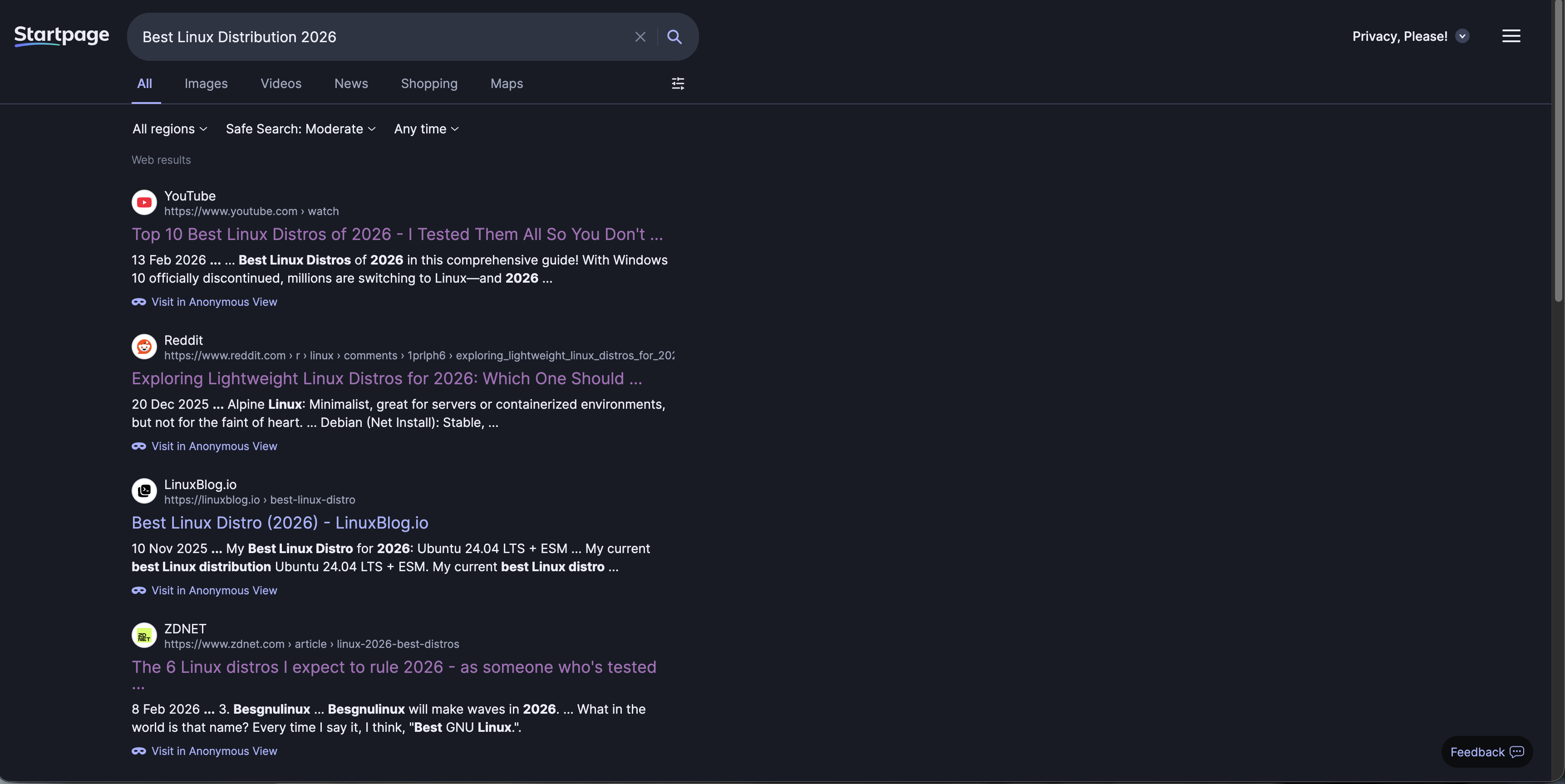
There was only one Reddit result, and the presentation was probably the weakest of the lot. The snippets and summaries made it difficult to infer what was actually inside each article without clicking through, which is a real problem on a query like this. If you are searching for Linux distro recommendations, you want to be able to glance down a page and quickly tell which result is for beginners, which is about gaming, which is nonsense, and which one is written by a Fedora zealot who thinks pain builds character.
Startpage was not bad so much as dull. Nothing about the results page really grabbed me, and nothing about the presentation helped me decide where to click first.
DuckDuckGo
DuckDuckGo’s AI summary came down broadly where Ecosia’s did: Ubuntu LTS first, with Zorin OS mentioned as another good pick, especially for people wanting something modern without getting too weird.
Again, that is not bad advice, but it felt a little safe. Ubuntu LTS is the default recommendation everyone reaches for when they want to avoid being wrong, and that was very much the tone here.

The ZDNET article showed up again, because apparently ZDNET has built a minor empire on the back of “best Linux distro” SEO. Interestingly, though, DuckDuckGo returned neither Reddit nor YouTube results here, which made the page feel narrower than it should have. That mattered, because the listicles it did return were of only middling quality. Once you remove the community discussions and the videos, you are left mostly with articles trying to be authoritative, and not all of them had earned that authority.
This was a poorer showing from DuckDuckGo than on the Warcraft query. Not disastrous, but flatter and more generic.
Brave Search
Brave Search gave by far the most comprehensive AI answer of the lot.
Its AI summary offered up a list of fourteen distributions, each with a quick explanation of why it might be a good fit. On paper, that is excellent. For a query like this, where use case matters more than any universal ranking, giving people a menu of options is exactly the right instinct. Beginners, gamers, tinkerers, old hardware, rolling release fans, enterprise-minded users, it covered a lot of ground.

The rest of the results were the standard soup of listicles, smaller blog posts, and YouTube videos, but Brave did at least sprinkle in some Reddit links too. One of them was the lightweight-distro thread I had already seen elsewhere; the other was effectively just another path back to ZDNET.
Thoughts on Search Two
Search Two mostly confirmed something I already suspected: for broad recommendation queries, every search engine is fighting the same war against listicle SEO.
The single funniest outcome here is that ZDNET appears to have absolutely cracked search engine optimisation for Linux distro recommendations. It was everywhere. Not always undeservedly, but everywhere nonetheless.
Kagi did well because it felt curated without feeling too sterile. Google’s AI summary was strong, but the rest of the page was oddly lighter than I expected. Bing was too dependent on its AI layer and too weak beneath it. Ecosia and DuckDuckGo both played it very safe. Qwant was clean but a little lifeless. Startpage was just not very compelling to read as a results page. Brave Search’s AI summary gave the most useful answer but its search results remained mediocre.
Search Three: Spanish Omelette Recipe
No backstory for this one. I just wanted to cook a Spanish omelette, so I gave every engine the very simple query:
“Spanish omelette recipe”
This turned out to be a much less dramatic test than the first two, but that in itself is useful. Not every search is a vague recommendation query or a recency-sensitive gaming search. Sometimes you just want dinner.
Unified Search Content
For once, the engines were all broadly on the same page.
Every one of them put BBC Good Food’s recipe at or near the top, and from there the pages were all populated by a very familiar cluster of established cooking sites: Serious Eats, Nigella, and the usual supporting cast of recipe blogs and food websites.
There were differences, but they were subtle. Kagi, Ecosia, and Brave tended to mix in a few more lesser-known blogs and smaller food sites among the bigger names, whereas the others leaned harder on the obvious staples. But in terms of actual usefulness, this was by far the most uniform search so far. Nobody went wildly off piste. Nobody buried the good stuff under nonsense. Nobody decided I probably wanted a casino result instead.
That makes this query interesting in a different way. When the content itself is relatively stable and the web has a few obvious authoritative answers, the search engine has less room to distinguish itself through raw relevance alone. At that point, what starts to matter more is how the page feels to use. How much clutter is there? Are the AI summaries actually helpful? Do the visuals help me decide where to click, or just fill space? Does the page respect my dark mode settings? Can I skim it comfortably while hungry and mildly impatient?
The AI summaries were all serviceable, although not equally so. Kagi gave what looked like a perfectly reasonable methodology, but was a little light on ingredient quantities. DuckDuckGo felt as though it was mostly paraphrasing BBC Good Food, which is fine if the source it is paraphrasing is already good. Brave and Bing probably offered the strongest AI-generated recipe summaries of the bunch, at least in terms of balancing method and ingredients in a way that looked immediately cookable.
So this test was less about who found the best recipe and more about who presented the recipe search experience best.
Kagi: Appearance
I like the way Kagi looks.
There is something about its presentation that feels pleasantly familiar, in a good way, almost like an older, calmer version of Google before everything became cards, widgets, generated answers, and attempts to guess what I really meant. The dark mode palette is especially nice, with the greys and purples feeling understated without being dull.
I also like the way Kagi handles mixed media. Images and videos are embedded neatly among the results without the page feeling overly busy, and the separation between each result is clean enough that it is easy to skim. It feels deliberate. Nothing is shouting at me.
Out of all the engines here, Kagi probably comes closest to feeling like a search engine designed for people who actually like using search engines.
Qwant: Appearance
Qwant feels very spacious, almost to a fault.
Part of that comes from the large feature images attached to results, which do make the page look more modern and visually appealing at first glance. The video embedding is also nice enough, although I found the horizontally scrolling video row a little awkward to use. Kagi’s more traditional layout is simply easier to interact with. Sometimes the old ways are old for a reason.
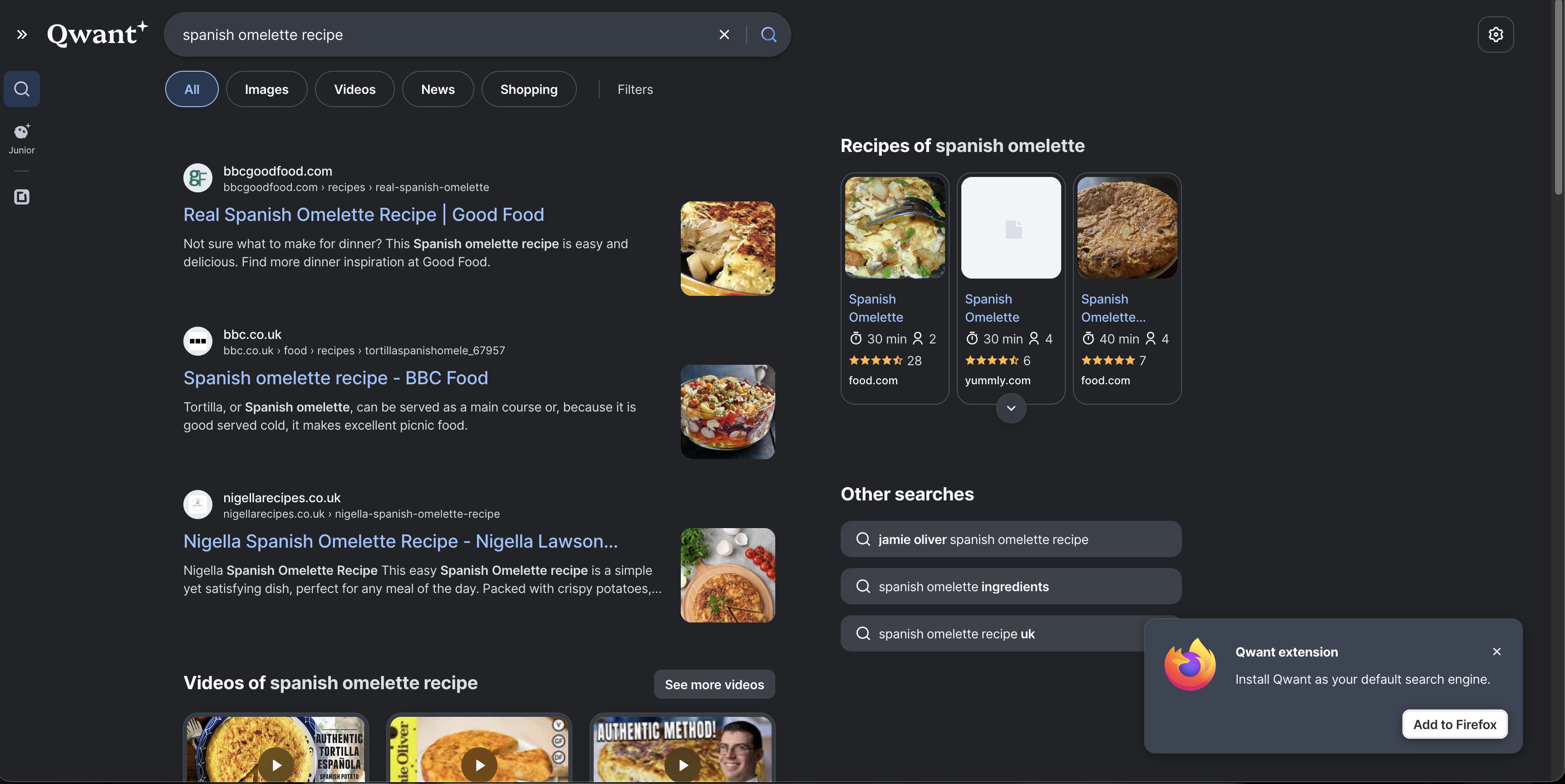
My bigger issue, though, is the extension nag. That Firefox extension prompt has been hovering over this entire comparison like an irritating little mosquito. Yes, I could dismiss it, but I do not think it should be sitting there so prominently in the first place. Once or twice, fair enough. Constantly, no thanks.
So while Qwant looks decent, it also feels a bit too eager to market itself to me while I am trying to evaluate it.
Startpage: Appearance
Startpage is barebones in a way that I do not think quite works in its favour.
There are no embedded images or videos in the results page proper, which makes everything feel flatter and more text-heavy than it needs to. That could have come across as clean and minimalist, but instead it mostly just feels a bit lifeless. The bluish-grey background also clashes slightly with the blue of the result titles, which gives the page a vaguely off look that is hard to unsee once noticed.
The result summaries do not help matters. They can look malformed, with awkward truncation and too many ellipses, which makes it harder than it should be to quickly understand what sits behind each link.
For a search engine whose main selling point is essentially “Google results, but private”, the presentation here feels strangely behind the times.
Ecosia: Appearance
Ecosia has a nice colour palette. The green accents are on-brand without being overbearing, and overall it feels softer and a bit more welcoming than some of the others.
That said, there are some odd layout choices. The gap between the bottom of the results and the footer is strange, leaving a slightly awkward slab of green visible at the bottom of the page. It is not a major issue, but it makes the page feel a little unfinished.
In this search, the related-searches sidebar also felt fairly redundant. At least it was positioned neatly enough that it did not get in the way. More annoying was the way Ecosia handled videos here: only two were shown initially, and then those same videos were repeated further down the page. There was no neat carousel or obvious way to browse more inline, just a push towards the separate video tab.
Perfectly pleasant visually, but not especially elegant in practice.
DuckDuckGo: Appearance
DuckDuckGo’s page felt busy at the top.
Between the recipe cards, the search-location and Safe Search controls, and the AI prompt, the upper part of the page felt a little crammed. None of these elements are individually bad, but together they create a sense of visual crowding that made the page feel more cluttered than it needed to for such a simple query.
The underlying colour palette is fine, though: sensible greys, blue links, nothing offensive. The right-hand sidebar of related searches again felt a bit redundant, but at least it was relevant and not aggressively intrusive.
DuckDuckGo is not ugly, but it does sometimes feel like it is trying to fit one too many ideas into the visible part of the page.
Brave Search: Appearance
Brave’s AI summary takes up a lot of real estate at the top of the page, which is increasingly becoming one of Brave’s signature traits whether I want it to be or not.
Below that, the recipe cards were actually quite nicely done. Better, I think, than Google’s in this instance. They felt clear, useful, and sensibly arranged. The page also displayed six video cards further down, which looked good and made it easy to browse without immediately clicking away.
What I found odd were the floating images on the right-hand side near the top of the page. They felt strangely placed and not especially useful. Not broken, just a bit weird. Brave also did that slightly irritating thing where it surfaced more and different video results lower down the page rather than consolidating them more cleanly into one section. If the videos are worth showing, just show them properly.
Still, the overall palette is nice, and visually it sits somewhere close to DuckDuckGo: dark, modern, and readable, if a little too willing to let AI dominate the first impression.
Google: Appearance
We all know what to expect with Google by this point.
The layout is familiar, polished, and easy enough to scan. The top organic result is prominent, and the recipe cards below it are useful, even if in this case I think Brave handled that component a little better. Interestingly, Google did not push an AI summary at me for this query, which honestly improved the experience. Sometimes the best possible AI feature is its absence.
The dark mode palette is good, the spacing is sensible, and nothing feels out of place. It is not exciting, but then Google does not need to be exciting. It just needs to feel normal, and it does.
Bing: Appearance
The loser.
Why? Because it is not respecting dark mode.
Every other engine here respected my system dark mode settings. Bing did not. I dug through the settings and could not find an obvious option to force it on, which made the experience immediately worse before I had even looked at the results properly.
And once you are staring at a bright page late at night, all the other problems become more annoying. It is spacious in the wrong way, with too much room given over to large UI elements and too little to actual results. It has consistently shown the fewest search results of the bunch because so much vertical space is being eaten up by design choices. The AI text at the top is comically large. Why?
The recipe cards were buried lower down the page, and to be fair they actually looked pretty good once I got to them. Showing calories, estimated time, and ratings in a compact format is useful. But even there, the image corners looked a bit odd, as though the cards were not quite visually settled.
So yes, Bing loses this round before we even get into philosophy, privacy, or relevance. I do not want to be flashbanged by my search engine.

Thoughts on Search Three
Search Three did not really separate the engines on relevance, because the web itself seems to agree pretty strongly on what a good Spanish omelette recipe result looks like.
That meant the differences were mostly about presentation.
Kagi looked the nicest to me overall, with the cleanest balance between traditional search results and modern media embedding. Google was its usual competent self. Brave looked good too, but once again gave far too much prominence to AI. DuckDuckGo was decent, but a bit cramped. Ecosia and Qwant both had some nice touches, but also enough awkwardness to stop them feeling especially polished. Startpage felt drab. Bing felt actively unpleasant.
If search one was about relevance, and search two was about ambiguity, search three was really about whether a search engine can just get out of your way and help you cook dinner.
Some of them are much better at that than others.
Comparison Table
Search Engine Comparison Table
With some extra information from Search Engine Party I built a quick little comparison table to help decide what search engine meets my needs.
| Engine | Privacy posture | Index / result sources | Paid or free | Tracking / logging | Notable controversies |
|---|---|---|---|---|---|
| Kagi | Strong privacy posture by design. Kagi says it has no ads and doesn’t track. | Kagi says it blends its own indexes (notably Teclis and TinyGem) with multiple external sources. It has also publicly confirmed continued Yandex use as one of many upstream sources. | Paid after trial: 100 free searches, then monthly paid tiers. | Search Engine Party does not currently list Kagi, so there is no third-party row from that dataset. From Kagi’s own docs, the main caveat is that it is a paid service, so account based use exists unless you lean on Privacy Pass / Tor. Kagi claim not to track or log. | Continued Yandex integration despite objections after Russia’s invasion of Ukraine, plus a CEO whose public responses can come across as combative in public threads. |
| Qwant | Markets itself as privacy-first and European, but its own policy confirms some data flows involving Microsoft and Bing. | Qwant says it uses APIs such as Microsoft Bing and third-party indexing services, while also building out Staan with Ecosia. | Free. | Search Engine Party rates Qwant as “Some” IP logging, “Some” IP sharing, and no third-party trackers in its testing. Qwant’s own privacy policy says Microsoft anonymizes Bing query data over time, while Qwant keeps some aggregated / obfuscated data. | Main issue is that it is less independent than its marketing suggests, still relying on Microsoft infrastructure while presenting itself as a privacy-sovereign alternative. |
| Startpage | Strong privacy pitch. Startpage says it does not save or sell search history, and offers Anonymous View for proxied browsing of result pages. | Startpage says it delivers Google results via its own privacy layer; its help pages also say it acts as an intermediary between users and Google and Bing. | Free. | Search Engine Party lists no IP logging, no IP sharing, and no third-party trackers for Startpage in its testing. Startpage’s own policy says once you click a result, privacy protection ends unless you use Anonymous View. | The big one is ownership. Its connection to Privacy One / System1 still hangs over it for privacy-minded users. |
| Ecosia | Privacy is not its main brand message, but it says it only collects data necessary to run search and ads, and anonymizes IP addresses after up to 7 days. | Ecosia says it currently uses a mix of Bing and Google, while also rolling out the Staan / European Search Perspective index with Qwant. | Free. | Search Engine Party lists “Some” IP logging, “Some” IP sharing, and third-party trackers present for Ecosia. Ecosia’s own privacy docs confirm that IP address and search terms are shared with Microsoft Bing or Google to provide results and ads. | Not billed as a privacy first engine, and that’s fine, with its infrastructure depending on Bing and Google. |
| DuckDuckGo | Strong mainstream privacy position. DuckDuckGo says “we don’t track you” and does not store personal search histories tied to individuals. | DuckDuckGo says most traditional links and images come largely from Bing, alongside its own crawler (DuckDuckBot), indexes, and many specialty sources. | Free. | Search Engine Party lists no IP logging, no IP sharing, and no third-party trackers in its testing. DuckDuckGo’s ad docs say Microsoft processes ad clicks and sees full IP / user-agent on clickthrough for billing. | The major controversy is the 2022 Microsoft tracker exception in its browser protections, plus its reliance on Microsoft ads / Bing for core search results. |
| Brave Search | Strong privacy posture overall. Brave says Search is built on an independent index, and it offers private / optional usage metrics controls. | Brave says Search is served from its own independent index. It also has optional Google fallback mixing in the Brave browser when enabled. | Free, with optional paid ad-free search and paid API usage. | Search Engine Party lists no IP logging, no IP sharing, and no third-party trackers in its testing. Brave separately says it can use private usage metrics, which can be turned off. | Multiple controversies: the affiliate link insertion incident in 2020, a Tor/DNS leak issue later patched, and wider trust concerns around Brendan Eich’s politics and public persona. |
| Weak on privacy by comparison; highly data-driven and ad-funded. | Google’s own index. | Free. | Search Engine Party indicates IP logging and sharing | Ongoing monopoly, competition, and privacy criticisms, self explanatory. | |
| Bing | Weak privacy posture by comparison; Microsoft’s ecosystem is still ad- and telemetry-driven. | Bing’s own index. | Free. | Search Engine Party indicates IP logging and sharing | Ongoing and well preached Microsoft privacy concerns. |
Notes
- Search Engine Party is useful, but its maintainer explicitly says the data is based on their and contributors’ research and is not 100% definitive.
- Kagi is missing from Search Engine Party at the time of writing.
- “No third-party trackers” here refers to what Search Engine Party observed on the search engine pages themselves, not a universal guarantee about what happens after clicking out to other sites or with ad-click flows handled by partners.
So, What Should I Use?
It is a difficult question, but I can rule out some of the candidates fairly quickly.
Obviously, Google and Bing are out. They were only ever here as baseline comparisons, and if privacy is part of the goal then neither makes much sense as a final recommendation.
Qwant is also out for me, simply because the latency was too noticeable. That is a shame, because the actual results were often good, but if a search engine feels consistently slow, that becomes part of the product. I am not interested in pretending otherwise just because the privacy story is appealing on paper.
Startpage also falls away. In theory it should be one of the easiest recommendations here: Google-quality results with a privacy layer in front. In practice, I found the results too inconsistent, and the ownership situation still hangs over it. I do not think it did enough in these tests to justify choosing it over the stronger alternatives.
Ecosia is easier to dismiss, not because it is bad, but because it is not really trying to be the most privacy-focused engine in the room - its core pitch is environmental after all. If your main reason for switching away from Google is tracking and profiling, Ecosia feels like the wrong tool for the job.
DuckDuckGo is more complicated. It remains one of the strongest mainstream privacy options, and its own policy still says plainly that it does not track you and does not save or share your search history in a way tied to you personally. At the same time, it is still tied to Microsoft for ads and much of its underlying search supply, and Microsoft handles ad clicks on DuckDuckGo’s behalf for billing purposes. That does not make DuckDuckGo fake privacy, but it does mean the relationship is awkward enough that I can understand why some people would hesitate. DuckDuckGo’s privacy policy and its page on Ads by Microsoft on DuckDuckGo Private Search are worth reading directly.
So for me, that leaves Brave Search and Kagi.
Both come with baggage. Brave’s broader company history is littered with controversies, from the affiliate link insertion incident to the wider trust questions around Brendan Eich, whose politics and public persona remain part of how many people judge the company despite these outbursts occuring years ago. That is before even getting into the long-running debates around Brave Browser itself. Kagi, meanwhile, has its own issues: ongoing use of Yandex as one upstream source, and a CEO whose public style can at times feel more defensive and argumentative than you might want from a premium subscription product.
Even so, I think Brave Search wins as the best free privacy-focused search engine in this group. It is independent-minded, its own index is a real strength, and while I often find it too eager to push AI summaries, it generally performed well enough to justify the recommendation.

For those willing to spend money, though, Kagi is the overall winner. Paying ten dollars a month for search will, understandably, sound ridiculous to plenty of people. But if you care enough about search quality, dislike the ad-funded web enough, and want the cleanest break from the Google/Bing model, Kagi makes the strongest case. It is not flawless, and I do not think its community sometimes does it any favours by talking about it as though it were morally pristine, but as a product it is the most convincing (and only real) premium/paid alternative.
If you do not want to pay for search and you want to avoid Brave, then the obvious fallback is DuckDuckGo. Its Microsoft relationship is not ideal, but it is still a long way from Google, and for a free mainstream option it remains one of the easier recommendations to make.
Which is perhaps the least glamorous conclusion possible. If you want the best free option use Brave Search. If you want the best overall option and do not mind paying, use Kagi. If you don’t trust brave or the people involved in it, and don’t want to pay for Kagi or don’t agree with its stance on some issues, then DuckDuckGo it is.